

Gear & Tone
How to load patches on the Boss GT-1, GX-10 and HX Stomp (with tone-tweaking tips)

Nov
You've downloaded a new patch set, plugged your unit into the computer and… have no idea where to start. Or you've loaded it, switched on, and the volume jumps between patches, or some patches sound nothing like the demo. This article shows how to load patches on three popular multi-effects units, the Boss GT-1, Boss GX-10 and Line 6 HX Stomp, plus a few steps after loading to make the tone suit your guitar.
What is a patch (preset)?
A patch is a saved set of settings: amp model, distortion, EQ, delay, reverb and master volume. Loading a patch means copying those settings from a file into your unit so you can use them right away instead of dialling everything in from scratch. If you're not sure about each setting yet, read 5 patch settings every beginner should understand.
Step 1: back up your current patches
Loading new patches can overwrite your existing patch slots. Before anything else, export all the patches you use to your computer. If you load something by mistake, you can always go back.
Step 2: import the file into the software
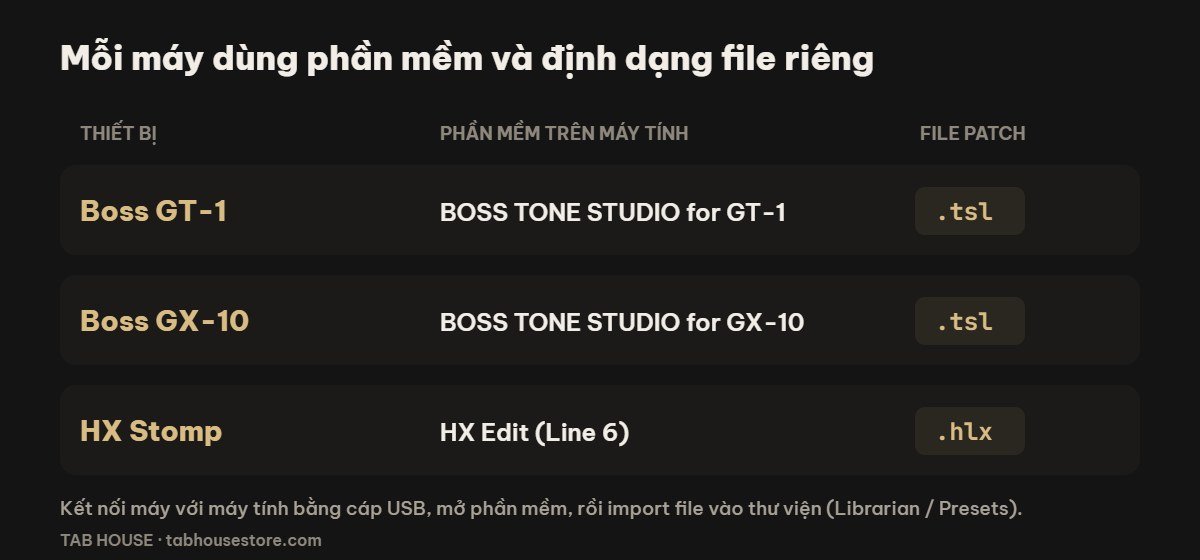
Boss GT-1 and Boss GX-10
- Install BOSS TONE STUDIO in the right version for your unit (the GT-1 and GX-10 have separate versions) and the USB driver if asked.
- Connect the unit to your computer with a USB cable and open BOSS TONE STUDIO.
- Go to Librarian, choose Import and open the file .tsl.
- Drag the patch from the library into the User patch slot you want, then Write it to the unit.
Line 6 HX Stomp
- Install HX Edit and update the HX Stomp firmware if the software asks you to (presets made on newer firmware may not open on older firmware).
- Connect the HX Stomp to your computer with a USB cable and open HX Edit.
- Drag the file .hlx into the preset list, or select a slot and use Import.
Step 3: adjust after loading
A patch is made on one particular guitar, speaker and volume level. Your guitar and speakers are different, so a few things need adjusting:
- Balance the volume between patches. Adjust Patch Level (Boss) or Output (HX) so the volume doesn't jump when you switch patches.
- Gain theo pickup. Humbucker pickups put out a stronger signal than single-coils; if the tone gets muddy, lower the gain a little.
- EQ theo loa. Headphones need less bass than a big speaker. Adjust the treble if the tone is harsh.
- Output select. Choose the right output mode (guitar amp, full-range speaker, headphones or line) in the global settings.
Common problems
- The file won't open: wrong software (for example using the GT-1 version of BOSS TONE STUDIO to open a GX-10 file) or firmware that's too old.
- The computer doesn't recognise the unit: try a different USB cable (many cables only charge and don't carry data) and install the driver.
- It sounds different from the demo: that's normal to some extent, because the guitar and speakers are different. Adjust as in step 3.
Patch Tab House
If you'd like patches already tuned for the stage, home practice and the studio, Tab House has patch sets for the Boss GT-1, GX-10, GT-1000, HX Stomp, NUX MG-400, Valeton GP-200, Hotone Ampero II Stage and Line 6 POD Go. Files are emailed automatically right after payment.
Frequently asked questions
Can GT-1 patches be used on the GX-10?
Better not. The two units use different software and patch structures, so use patches made for your exact model.
Will loading patches erase the unit's original patches?
Only if you overwrite those slots. The factory presets are usually still there, and you backed up in step 1.
Read next: checklist for buying your first electric guitar.
